Screen Shots
Here's a closer look at each feature and more about what each one does.

Calculate Control Key
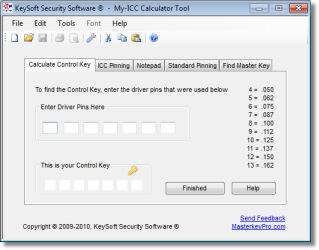 Have you ever had a job where there were several ICC's to
re-key but no Control Key to remove the cores with?
Have you ever had a job where there were several ICC's to
re-key but no Control Key to remove the cores with?Owner's have been known to misplace this key, sometimes they don't even know what it's for. Or maybe they didn't get it from the previous tenant or owner when they moved in. This happens more than you might think.
Now you can use this feature to calculate the Control Key from an existing ICC so you can cut a working Control Key to remove and reuse existing ICC's easily.
Simply pick or drill one of the cores, and remove it from the lock. Then enter only the Driver pin number for each chamber in the Driver Pin field and let My-ICC Calculator calculate and display your Control key. It's that simple.
This works on the most common ICC's out there, including Best, Falcon, KeyMark and other A2 type ICC's.
ICC Pinning
 Say someone comes into your shop, or you're on a job and
you find out they have a couple ICC's they would like you to re-key. This
usually takes more time than you would normally like to spend to do a
couple cores, you would need to sit down and figure out all the complex ICC
pinning, that is until now.
Say someone comes into your shop, or you're on a job and
you find out they have a couple ICC's they would like you to re-key. This
usually takes more time than you would normally like to spend to do a
couple cores, you would need to sit down and figure out all the complex ICC
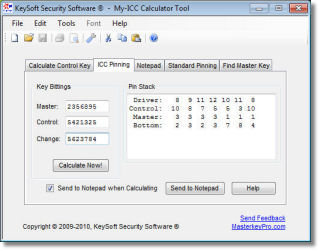
pinning, that is until now. The purpose of this feature is to calculate all the complex ICC pinning for you, based on your input. Just enter your Master key, Control key, and Change key, then click the Calculate Now! button. If you don't want it Mastered just leave the Master key field blank.
You can send this pinning information right to the built in Notepad as it calculates your pinning if you want. Calculate as many as you need then Print them out now, or Save and Print them out later.
Notepad
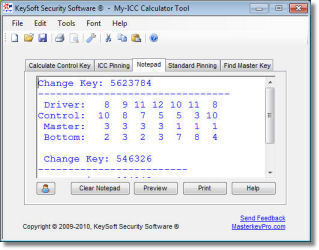 Both the ICC and Standard Pinning pages can send there pinning information directly to this Notepad, or it can be copied and pasted
somewhere else.
Both the ICC and Standard Pinning pages can send there pinning information directly to this Notepad, or it can be copied and pasted
somewhere else.
The built in Notepad gives you a place to store multiple Pin Stacks, and make notes if you want to. From there you can
Print your pinning chart for your records or to work from. Then Save it for later use.
Standard Pinning
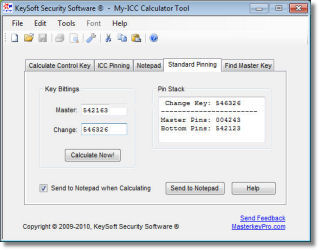 The purpose of this feature is to calculate and display the proper Bottom and Master pins needed to Master key your
locks to a separate Change key and a Master key. Just enter your Master key and Change key then click the Calculate Now! button.
The purpose of this feature is to calculate and display the proper Bottom and Master pins needed to Master key your
locks to a separate Change key and a Master key. Just enter your Master key and Change key then click the Calculate Now! button.
Calculating the bottom and master pins for a standard lock-set is not to tough, it's mostly time consuming but this
feature can really speed-up that process.
This feature can eliminate the math
and help you get it all neatly on paper without the mathematical errors that might otherwise happen.
From there you can Print it out, then Save it for later
if you like.
So if it's a small "hand-full" of changes
you're after, you might find it simpler to just use this
feature.
Both the Standard and ICC Pinning pages can send their
pinning information directly to the Notepad or it can be copied and pasted
somewhere else.
Find Master Key
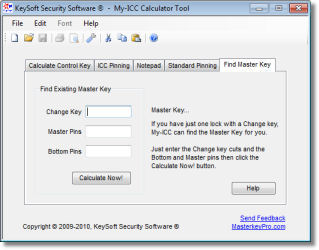 Say you get a fairly large sized job to re-key, but you have just one problem. The new owner bought it from the bank and the old owner
kept the Master Keys or won't give them up. Or for other reasons.
Say you get a fairly large sized job to re-key, but you have just one problem. The new owner bought it from the bank and the old owner
kept the Master Keys or won't give them up. Or for other reasons.
The purpose of this feature is to calculate and display the proper Master Key for a system so you can cut a working Master Key. With a working Master key you don't need to pick every lock on the job to remove and re-key it. Just use the master key, this can be a huge time saver.
<1>
<2>